For Apple Silicon Macs, macOS 15 or later
The answer is in your documents. Have it ready during the call.
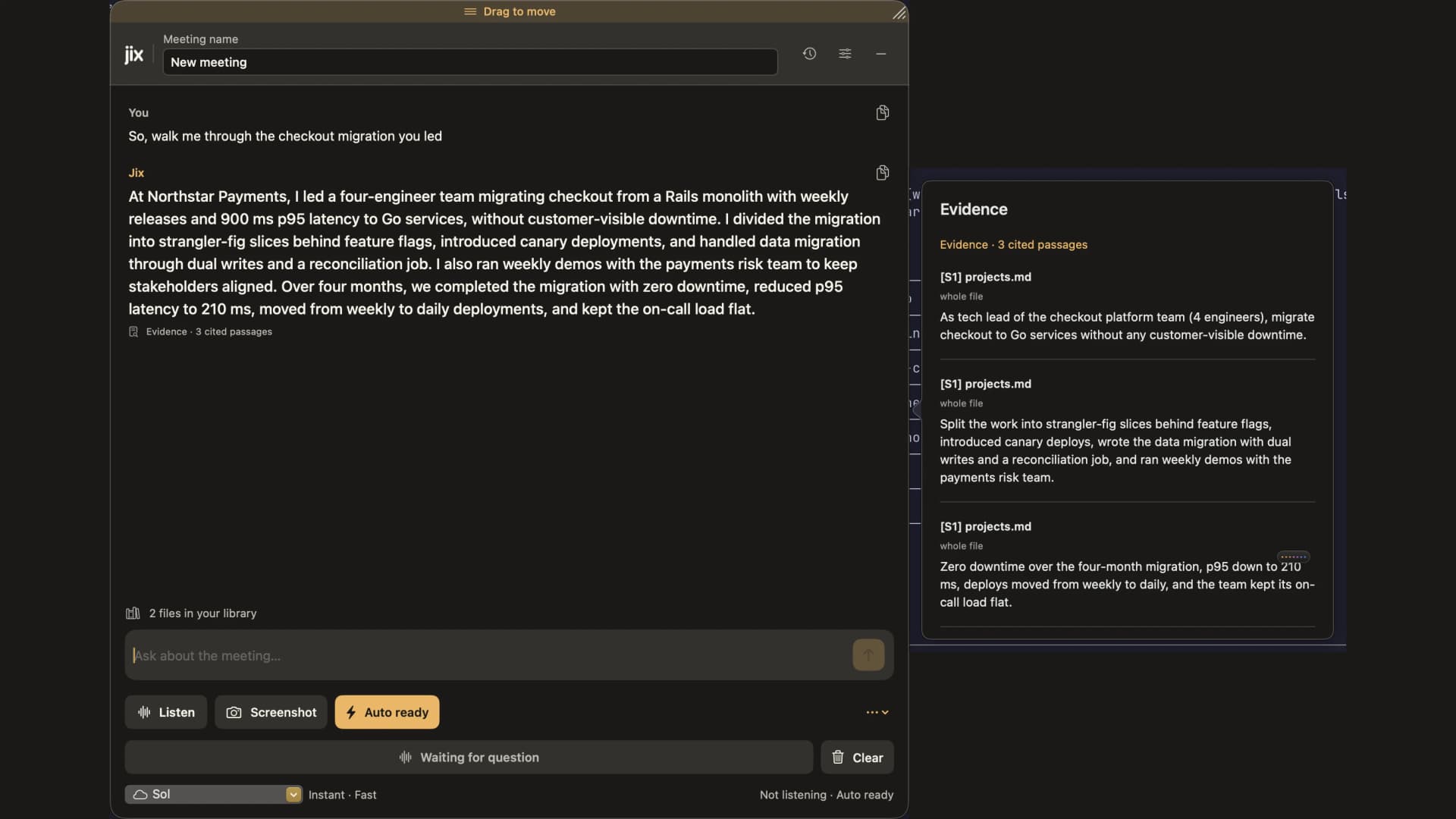
A customer asks about your spec or proposal. Jix searches the files you gave it and drafts an answer. Open cited passages when available before you speak.
How Jix works.
Three steps, from your files to an answer you can check before you speak.Actual Jix panels. The call and the documents are synthetic.
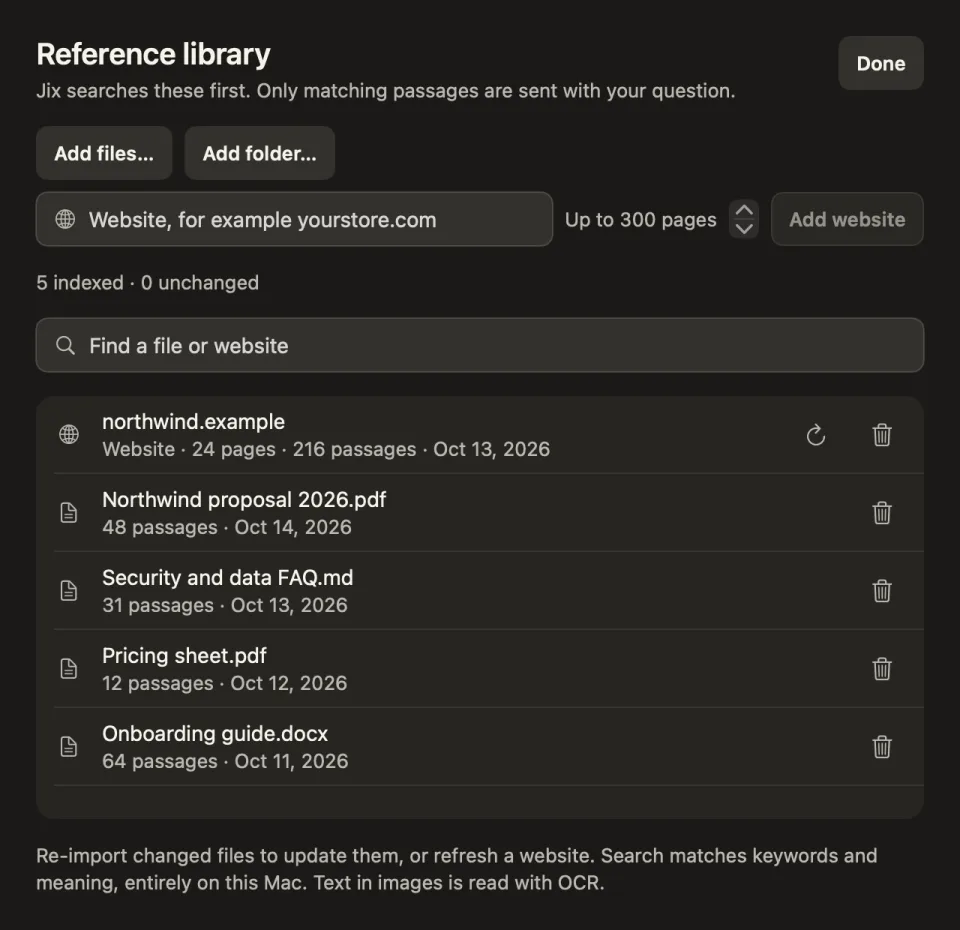
Step 1 of 3
Add.
Put your proposals, price sheets, FAQs and website into the Jix library. It indexes them on your Mac.
Step 2 of 3
Listen.
Confirm you told everyone on the call. Then Jix turns what they say into text on your Mac.
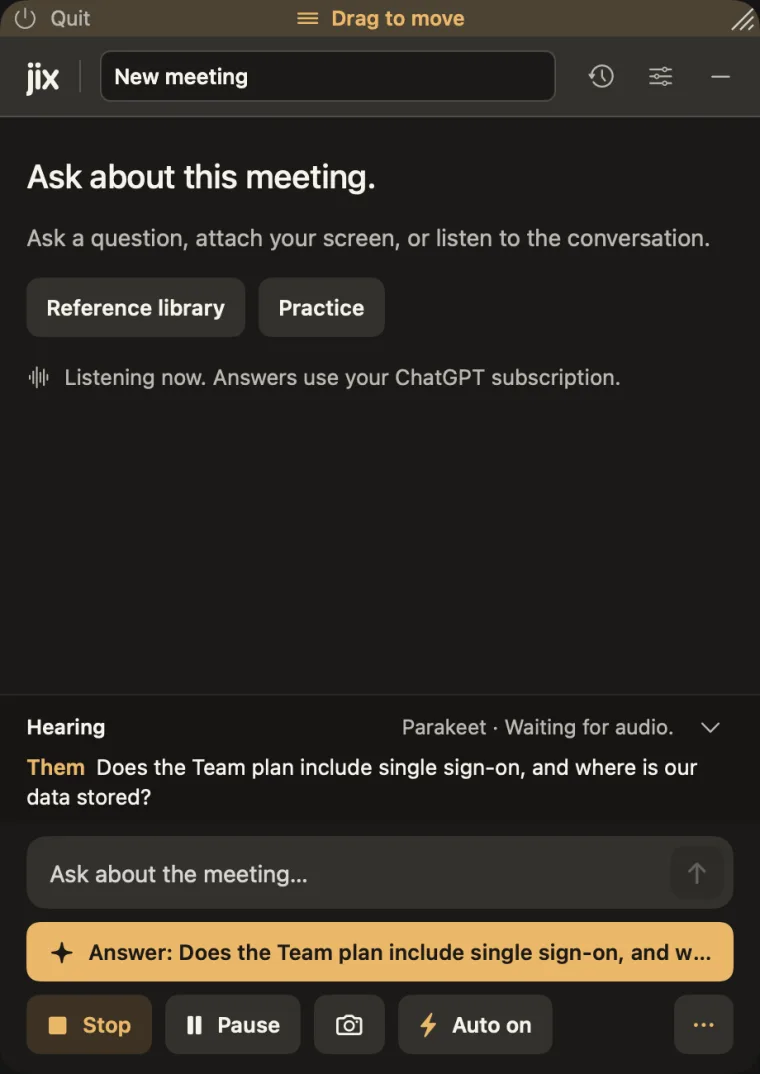
 ThemDoes the Team plan include single sign-on, and where is our data stored?
Step 3 of 3
Answer.
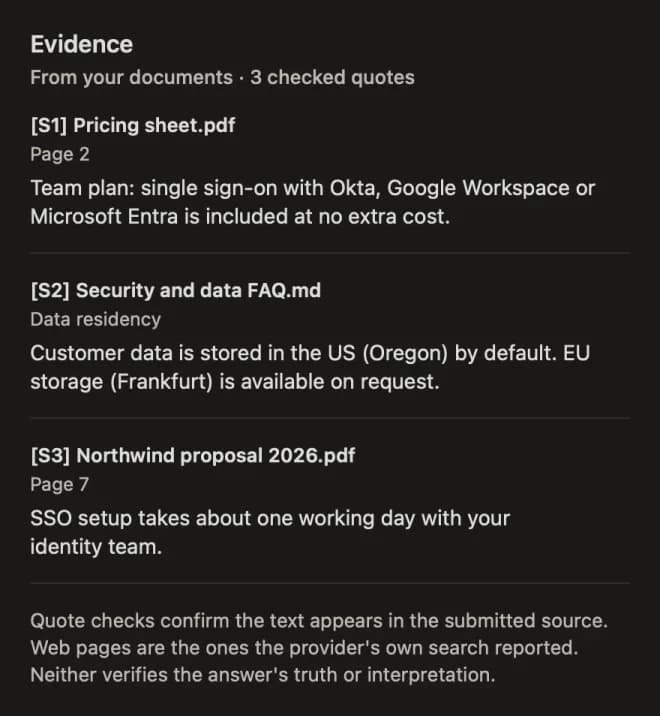
Jix drafts a reply from your files and shows the quotes it used, so you check before you speak.
Choose a plan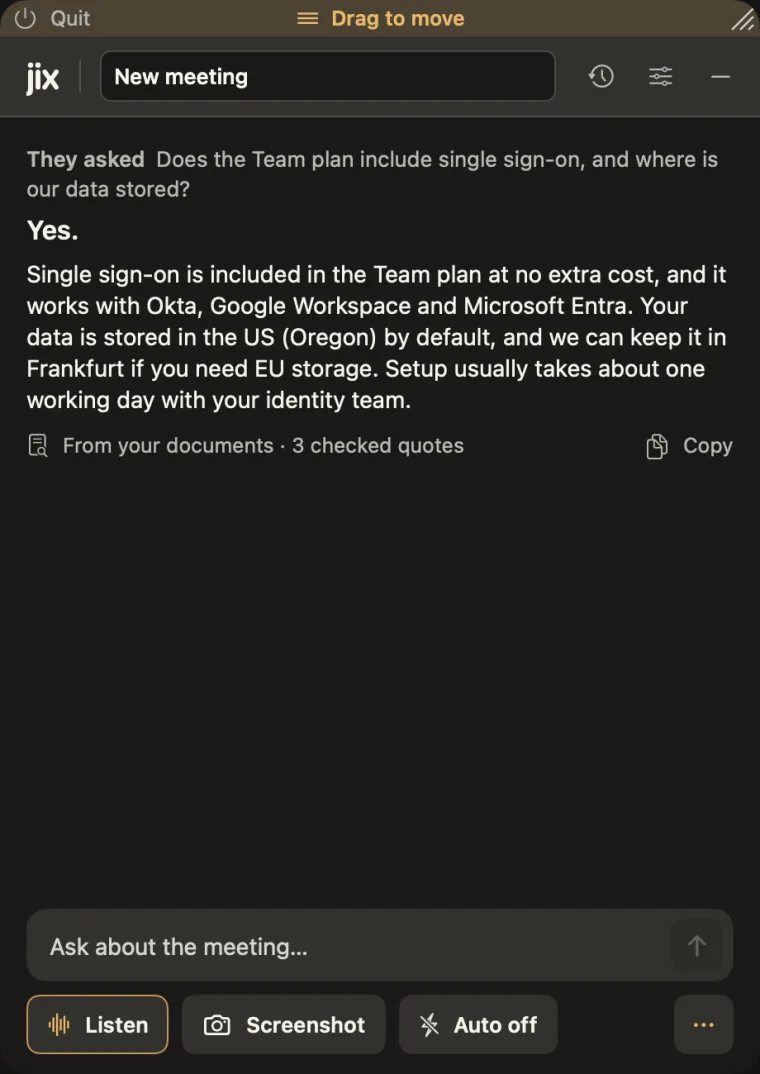
A small panel beside the work you are already doing.
Ask directly or let Jix catch a question during a permitted call. Open Evidence to read the cited passage before you use the answer.
English uses an optional on-device Parakeet model download. Other supported languages use Apple's on-device Speech and may prioritize meeting audio when both inputs are selected.
Your files are indexed on your Mac.
Transcription, screen text reading, and document indexing happen locally. Saved text history is off until you turn it on.
Use your own ChatGPT, Claude or Gemini
Connect your own ChatGPT account through OpenAI’s Codex sign-in or your own Claude account through Anthropic’s Claude Code, both in your browser, or paste your own free Google AI Studio key for Gemini. Jix includes the supported runtimes, so there is no separate CLI install. Cloud answers can send selected questions, transcript excerpts, document passages, and attached screen images to the provider you pick. Availability and usage limits depend on your account.
Or run Ollama locally
Choose a model you run on your Mac for local answer processing. Model installation is yours to manage. License checks still go through our license server.
Read the Jix privacy policy for the full data path.
Pricing.
One person, up to two Macs. Bring your own AI account or local model. AI usage is separate.
Needs a Mac with Apple silicon (M1 or later) and macOS 15 or later. It does not run on Intel Macs.
Tick the box to turn on the Buy buttons.
Free
Unlimited practice, 3 library documents, and 20 minutes of live listening, once. No card needed.
7-Day Pass
Full access for 7 days. One payment, it does not renew.
Monthly
Full access, billed every month.
Renews automatically every month at $17.99 until you cancel. Cancel any time online at My Orders; you keep access to the end of the month you paid for.
Yearly
Works out at $12.42 a month.
Renews automatically every year at $149 until you cancel. Cancel any time online at My Orders; you keep access to the end of the year you paid for.
Lifetime
Every 1.x update. A future 2.0 is a separate purchase. It does not renew.
Lemon Squeezy, our merchant of record, handles checkout and tax. All sales are final, except where the law of your country gives you a right to a refund. Try the free plan before you buy. Read the Jix terms.
Jix Counter Kit, for stores and front desks
Put Jix behind the counter.
A customer asks something your new hire does not know yet. Jix hears the question, finds the answer in your own price lists and product sheets, and shows it on a screen your staff can read. They keep talking. No typing, no searching.
- Watch stores
- Electronics shops
- Clinic front desks
What the kit includes
A Jix license
The Mac app that listens at the counter, finds the answer and shows it. It runs on an Apple Silicon Mac, with a local model or your own AI account.
A teleprompter screen
A glass teleprompter with its own display that stands at the counter. Jix works on a teleprompter or any second screen.
Setup by us
We install Jix, load your price lists, product sheets and policies into its library, and walk your staff through it.
Frequently asked questions.
What Jix is, what it costs, and how it handles meeting privacy, local indexing, screen sharing, and AI connections.
What is Jix?
Jix is a Mac app from DevX Group LLC for consultants, sales engineers and anyone who answers detailed questions on calls. It listens to the call on your Mac, searches the PDFs, notes and folders you gave it, and drafts an answer with the cited passages it used, so you can check the source before you speak.
How much does Jix cost?
7-Day Pass $12.99 once, Monthly $17.99 / month, Yearly $149 / year, Lifetime $349 once. Every plan is a license for one person on up to two Macs. The 7-Day Pass and Lifetime do not renew. AI usage is billed by your own AI provider and is separate.
How do I cancel a Jix subscription?
Cancel any time online from Lemon Squeezy My Orders (app.lemonsqueezy.com/my-orders). You keep access to the end of the month or year you paid for. All sales are final, except where the law of your country gives you a right to a refund.
Can I use Jix in a job interview or an exam?
Only where the rules allow it and everyone on the call knows. Many employers, schools, certification bodies and interview processes forbid outside help, and following their rules is your responsibility. Jix is a notes and preparation tool, and you can use it to practice for an interview. It is not designed to deceive anyone or to defeat proctoring or monitoring software.
Will others see Jix when I share my screen?
Yes, Jix can appear if you share or record your whole screen. Tell the people on the call that you are using Jix. We make no claim that Jix is hidden from any screen-sharing or recording app.
Do I need to tell the people on my call?
Tell everyone that you are using Jix, and obtain any consent or permission required by applicable law, your workplace or school, or the meeting’s rules. Pause Jix if anyone objects or someone joins who has not been told. Jix can show a reminder when listening starts; obtaining any required consent is your responsibility.
Does Jix record or upload my meeting audio?
Call audio is transcribed on your Mac and is not uploaded. English uses NVIDIA Parakeet (an optional download of about 600 MB). Other supported languages use Apple’s on-device Speech. Cloud answers can send selected transcript excerpts, document passages and screen images to your AI provider. Local Ollama keeps answer processing on your Mac.
How does Jix retrieve answers from my documents?
Jix indexes your imported PDFs, Markdown, text, and images locally using SQLite FTS5 keyword matching fused with on-device vector embeddings. Grounded answers show cited passages you can open and check. A quote is evidence to inspect, not a guarantee that the answer is correct.
What happens if an AI provider reaches its limit?
For eligible quota or temporary failures, Jix normally tries configured backups after your selected provider. ChatGPT Fast falls back to Standard first. Backups then run in order: connected ChatGPT through Codex, Claude subscription through Claude Code, a configured Gemini API key, and your selected Ollama model if installed and running. Settings controls automatic backups. A cloud backup can receive the same question, selected excerpts, and attached images. Temporarily limited providers may be tried later while another ready provider answers. If no backup is ready, the answer can stop; select or reconnect a provider to continue. An Ollama primary never switches to cloud.
What AI model or account do I need?
Use what you already have: your ChatGPT account through OpenAI’s Codex sign-in, your Claude account through Anthropic’s Claude Code, Gemini through your own free Google AI Studio key, or a local model on your Mac with Ollama. AI usage is billed by that provider and is separate from the Jix license.
Does Jix work offline?
Partly. Listening, transcription and document search run on your Mac. Answers come from the AI you connect: with a local Ollama model, Jix can answer with no internet connection. ChatGPT, Claude and Gemini need a connection. The English speech model is a one-time download. A paid plan checks its license online at least once every 24 hours and after your Mac restarts.
What are the Mac hardware requirements?
Jix requires an Apple Silicon Mac (M1, M2, M3, M4 or later) running macOS 15.0 or later.
Be ready for the question in your own notes.
Pick a plan, get your license key by email, and download Jix for your Apple Silicon Mac. Questions first? Write to support@devxgroup.io.
Choose a plan